|
Merging multi-files using batch mode(Horizontal and Vertical)
|
   |
|
Merging multi-files using batch mode(Horizontal and Vertical)
|
|
To do file merge, user need to use "Append Mode" or "Column Append Mode" together with "Batch Runner" during the operation.
Merge files Vertically:
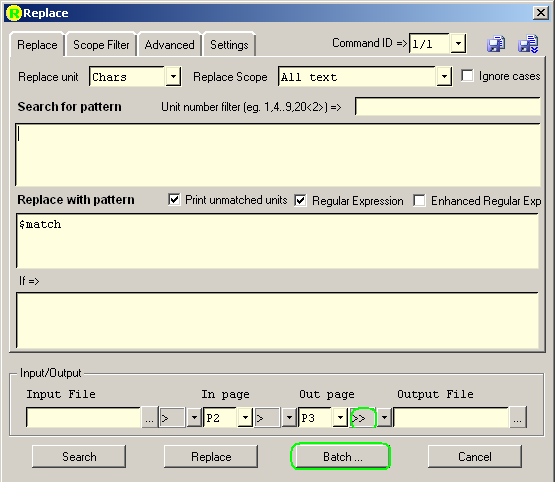
1. Open "Replace" dialog
2. Change the Write Mode to ">>" before the Output File entry.
3. Click "Batch..." button open "Batch Runner", and click "Pick Files" to load the input files into the list.(see Batch Mode Operation for detail)

4. Change "Set Output File Name" to a fixed output filename, the Output File column will all be changed to this file name.
5. Click "Batch Replace" in the "Batch Runner" dialog.
Merge files Horizontally:
The same as "Merge files Vertically" except that in step 2, user should select Write Mode ">>>" instead of ">>". see Write Mode(Overwrite,Append,Column Append) section for detail.
An easier way to make File Merge since Version 2.0:
User can select "Tools->Batch Runner" directly, after choosing files from directory, user can click "File Merge" button and finish operation, please refer to Batch Runner for detail.