|
File Overwrite confirm/Backup settings
|
   |
|
File Overwrite confirm/Backup settings
|
|
User often need to save output to files in replace operations. Sometimes the output file already exists, there are 2 related switches:
1. Create backup file before overwriting file or not.
2. Confirm with user before overwriting file or not.
User can turn on/off one or both of above switches by open "Settings->Settings" menu, "File split/backup setting" frame.
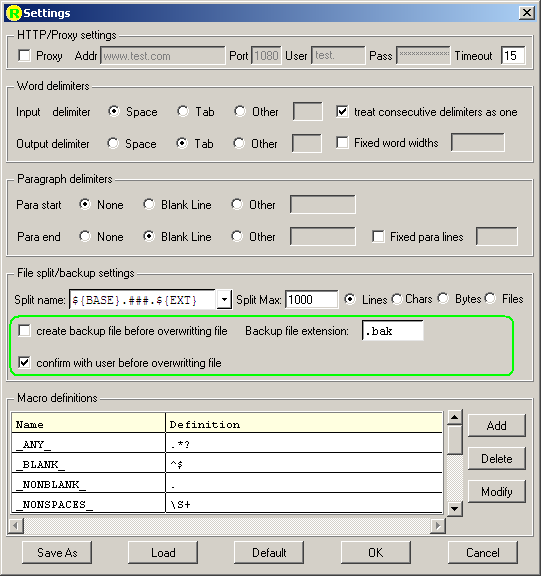
User can also change the default backup file extension .bak to others, such as .new.
Note 1: If user's operation is to append to the file (>> or >>>), no backup confirm prompt and no backup file created.
Note 2: If the backup filename already exists, such as filename.bak, system will try to create a new backup file like filename.bak1 or filename.bak2 ..., until the file does not exist.
Note 3: After user open a new "Replace" dialog, the settings value will be automatically filled into "Settings" page of "Replace" dialog, use can change the settings page here if necessary.