|
Batch Files Selection
|
   |
|
Batch Files Selection
|
|
There are 6 ways to generate the batch files list:

1. Drag Files from browser and drop to "Batch Runner" window


Note: you can also drop files to editor window or "Replace Pioneer" program icon directly.
2. Pick Files from browser
By entering File types Filter and clicking "Pick Files" in "Batch Runner" dialog, a "Pick Multiple Files" dialog box poped-up.
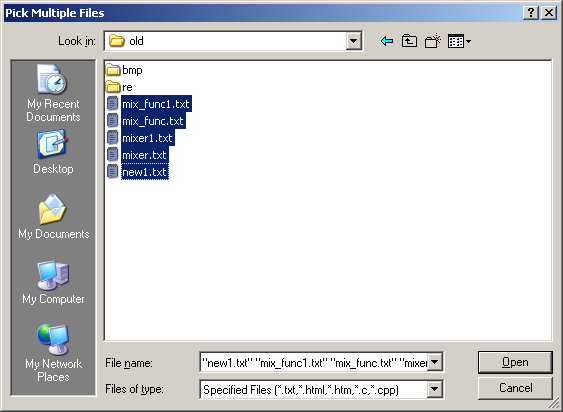
User can select one or many files by using ctrl or shift+mouse click. The loaded files are sorted by name by default, user can sort by date or other columns by clicking the column header.
3. Search Files from browser
By clicking "Search Files", a dialogbox "Search Files" is poped-up.

1) User can select "Text", "Binary", "Doc" or "Pdf" as search file type.
2) User can enter "File name Filter", "Search Directory" to search for files.
3) User can also filter the file by checking the Containg Word/Phrase.
Some advanced options are also provided:
Ignore cases switch: For instance, 'abc' ignore cases will match all files containing 'abc','ABc' or 'ABC', 'abc' without ingore cases will return all files containing exact 'abc'.
Regular expression switch: For instance, 'abc.d' with Regular Expression switch will match abcad, abc1d, abcxd, ..., but 'abc.d' without Regular Expression switch will only match exact 'abc.d'
Cross line switch: For instance, 'abc.*?def' with Cross Line switch will match 'abc' and 'def' in different line, but 'abc.*?def' without Cross Line switch will only match 'abc' and 'def' in same line.
4) Maximum size and Minimum size switch can help user to limit file size for searching.
5) Last modify time is provided for user to limit the last modify date and time
6) If Search Subdirectory switch is checked, all the subdirectory will be searched recursively
By clicking "Search",the original batch file list will be cleared, the searched files will be added into batch files list.
4. Paste file from windows File Explorer
User can also select files from Window File Explorer, and copy these files. Then click "Paste File" Button in "Batch Runner", the file list will be created.
5. Extract http links from web address
By clicking "Extract links" button, a "Extract Links" dialogbox is poped-up.

At the top, user can enter Link Type Filter to select required type.
There are maximum 9 web addresses can be entered below for Link extracting. After user enters web addresses and click "Extract", all the links meet the filter criteria will be populated to the batch file list.
If user want to extract links 1 level deeper for some types of link like 'html', option "Extract 1 level deeper for link type" should be checked and corresponding link type can be set.

6. Batch Create links
By clicking "Create links" button, a "Create Links" dialogbox is poped-up.

User can input a Link Template string, where [###] inside the string will be explained as consecutive numbers, the count of # determin the width of the number.
You can specify the start number and end number below, you can also specify the "Download As" type.
After the template string or number changed, the preview window is updated.
Click "Create" button at the bottom, the links will be created in the file list.
"Clear List" option:
If this options is Checked, the file list window will be cleared before any operation to load the file list.
If this options is not Checked, the file list window will not be cleared for any operation to load the file list, new list will be appended to the bottom of old list.